
Your Guide to DLIMS Punjab
WELCOME TO DLIMS PUNJAB

Effortless Application Process
Apply for your driving license from the comfort of your home. Skip the queues and paperwork with our streamlined online application proces
Real-Time Application Tracking
Stay updated throughout the process with our real-time application tracking. Access a personalized dashboard to receive instant updates and keep informed every step of the way.
Secure Payments via ePay System
Make secure payments through our ePay system and easily generate your Payment Slip Identification (PSID) token. This unique identifier streamlines the payment processing, ensuring a safe transaction.
A Simple Guide to Getting Your License
Quick Guide to Secure Your Learner, Regular, or International Driving License: Take a look at our easy-to-follow guide. It helps you understand the step-by-step process to apply for and benefit from getting your driving license.
Step 1

Create Account & Login
Start your driving adventure by registering or logging into our online portal. Experience a simplified process designed to make getting your license easier.
Step 2

Fill Application Form
Complete your application form accurately with all required details to ensure a smooth process for your learner’s license application.
Step 3.

Generate PSID
Upon submitting your application, a unique Public Service Identifier (PSID) will be generated for your reference and processing.
Step 4

Payment Confirmation
After submission and successful payment processing, you will receive a payment confirmation.
Step 5

Print Learner
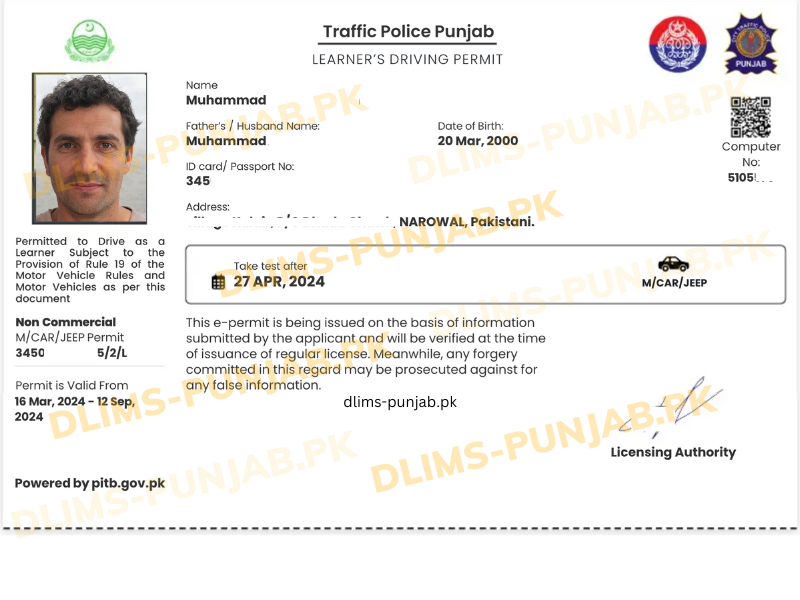
Print a physical copy of your learner’s license directly from our system. Get ready to hit the road safely!
It`s time to get your Learner License

Step 1
Create Account & Login
Start your driving adventure by registering or logging into our online portal. Experience a simplified process designed to make getting your license easier.
Step 2
Fill Application Form
Complete your application form accurately with all required details to ensure a smooth process for your learner’s license application.
Step 3.
Generate PSID
Upon submitting your application, a unique Public Service Identifier (PSID) will be generated for your reference and processing.
Step 4
Payment Confirmation
After submission and successful payment processing, you will receive a payment confirmation.
Step 5
Approval
After submission, your application undergoes an administrative review. Upon approval, you will be notified of the successful approval by the administration.
Step 6
Processing & Dispatch
Once approved, your driving license application will be processed and dispatched to you accordingly.
It`s time to get your Regular License

Step 1
Create Account & Login
Start your driving adventure by registering or logging into our online portal. Experience a simplified process designed to make getting your license easier.
Step 2
Fill Application Form
Complete your application form accurately with all required details to ensure a smooth process for your learner’s license application.
Step 3.
Generate PSID
Upon submitting your application, a unique Public Service Identifier (PSID) will be generated for your reference and processing.
Step 4
Payment Confirmation
After submission and successful payment processing, you will receive a payment confirmation.
Step 5
Approval
After submission, your application undergoes an administrative review. Upon approval, you will be notified of the successful approval by the administration.
Step 6
Processing & Dispatch
Once approved, your driving license application will be processed and dispatched to you accordingly.
Get your International License
A Step by Step Guide
Creating and Managing Your DLIMS Account
The Driving License Issuance Management System (DLIMS) of Punjab, Pakistan, offers an efficient and convenient way to create and manage your DLIMS account meeting your driving license needs more effectively and simplifies the process of obtaining and managing your driving license in the Punjab province of Pakistan. In this article detailed method of DLIMS Punjab new account registration process is explained. On our website you will also learn how to apply for driving license online Punjab. This step-by-step guide will walk you through the process of creating and managing your DLIMS account on the official website.
Creating Your DLIMS Account
Step 1:
Access the Official DLIMS Punjab Website
First of all open your web browser and navigate to the official DLIMS Punjab website. The official website of DLIMS Punjab is dlims.punjab.gov.pk. Make sure you have a stable internet connection for a smooth experience.

Click on the “Login” button in right top corner.
Step 2:
Visit the Registration Section
Once you are on the homepage of the DLIMS website, look for the registration or sign-up section. This is usually found on the top menu or as a highlighted option on the homepage. Click on the “Register” or Create Account” button to start the process of registration. DLIMS Punjab login for existing account can be used if you have already created DIMS account.

Click here on the “Create Account” link to start the process of registration.
Step 3:
Fill in the Registration Form
You will be directed to a registration form that requires providing your personal information. The details you need to provide include:
- Full Name: Enter your name as it appears on your national identification card.
- CNIC (Computerized National Identity Card) Number: Enter your 13 digit CNIC number. This is a mandatory field.
- Date of Birth: Ensure the date format matches the system requirements.
- Email Address: Provide a valid email address for account verification and communication purpose for future reference.
- Mobile Number: Enter a working mobile number for SMS notifications.
- Gender: Select your gender
- Create a Secure Password:Choose a strong password for your DLIMS account. It should be a combination of letters, numbers, and special characters to ensure maximum security. Re-enter the password to confirm it.
- Complete the CAPTCHA:To verify that you are not a robot, complete the CAPTCHA challenge presented on your screen. This step is essential for security purposes.
- Submit the Registration Form:After filling in all the required information, review the details for any mistakes and errors. Once confirmed, click on the “Submit” button to proceed. You will receive a confirmation email or SMS with a verification link or code.

Click on “Register” button after filling the required data.
Step 4:
Verify Your Account
Check your email inbox or SMS for the verification message from DLIMS. Click on the verification link or enter the provided code on the DLIMS website to activate your account.
Step 5:
Log In to Your DLIMS Account
With your account now activated, return to the DLIMS website homepage and click on the “Login” button. Enter your registered email address and password to access your account and avail services of DLIMS related to driving license etc.

Click on the “Sign In” after entering your credentials .
New LearNers
DLIMS USERS ACTIVE
INTERNATIONAL USERS
RENEWAL APPLICATIONS
FOR DLIMS REGISTERED USERS
Managing Your DLIMS Account
Update Your Password
To update your password, follow these steps:
- Click on “Update Password.”
- Enter your current (old) password.
- Enter your new password.
- Confirm your new password by entering it again.
- Click “Save Changes” to update your password.

“Login” to your DLIMS account to get this screen .
Applying for a New License
To apply for a new driving license, select the “Apply for New License” option from the dashboard to initiate the application process for a learner’s permit or regular driving license.. Follow the instructions provided, fill in the necessary details, and upload required documents.

To apply for “Learner License” click on Apply.
Renewing Your License
If you need to renew your driving license, choose the “Renew License” option to apply for the renewal of your existing driving license. This option applies to Learner Licenses, Regular Licenses, and International Licenses. The system will guide you through the renewal process, including fee payment and document submission.

For “Renewal License” click on your desired License type.
DLIMS Tracking Application Status
DLIMS allows you to track the status of your application. Simply go to the “Track Application” section and enter your application number to see the current status and any actions required.
Track License Delivery: If you have applied for a new license or renewal, you can track driving license delivery Punjab status through this section.
For “Renewal License” click on your desired License type.
Printing Challan Forms
For any payments, you may need to print challan forms. The “Print Challan” option on your dashboard allows you to generate and print these forms for bank submission.
For “Renewal License” click on your desired License type.
“License” Tab Features
Once you logged into your account you will see “Learner” section on the dashboard. Under this section you will see different options related to different types of Licenses.
1. Learner License
In this section the options available are: Apply, Renew, Pending Applications, Paid & Applications
2. Regular License
In this section you will find: Renew, Renewal Applications, Duplicate & Duplicate Applications
3. International License
Under this section of International Permit two options are available: Renewal & Renewal Applications

For “Renewal License” click on your desired License type.
Additional DLIMS Features
You can explore other features offered by DLIMS, such as downloading application forms, news updates related to driving license and finding the nearest driving license centers in different cities of Pakistan.
Some important points while creating DLIMS Account
- Ensure you have a valid email address and phone number linked to your account for important updates and notifications for future reference.
- Remember your login credentials (13 digit CNIC number and password) for future access.
- Keep your CNIC information and other details updated within your account.
- Utilize the DLIMS website for all your driving license-related needs in Punjab.
By following these steps, you can create and effectively manage your DLIMS Punjab account, effectively managing your driving license application, tracking and management process.